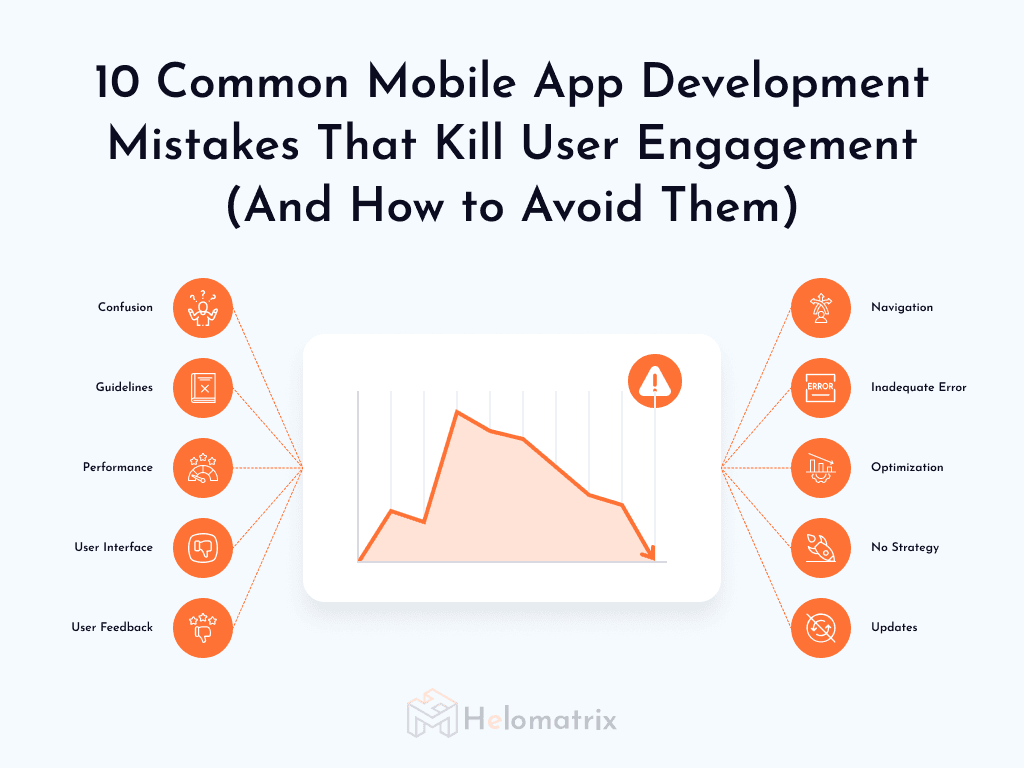
10 Common Mobile App Development Mistakes That Kill User Engagement And How to Avoid Them

Discover the 10 most critical mobile app development mistakes that destroy user engagement, along with practical solutions and best practices to avoid costly pitfalls.

Introduction

Introduction

Parth Gupta · 10 min read · 09 Dec 2025

Building a mobile app is like constructing a bridge—one structural flaw can bring the whole thing crashing down. After 7 years in the mobile development industry and launching 50 successful projects at Helomatrix, I've witnessed countless promising apps fail not because of bad ideas, but because of avoidable development mistakes.

The statistics are sobering: 71% of app users churn within the first 90 days, and 25% of users abandon an app after just one use. But here's the thing—most of these failures stem from the same recurring mistakes that we see across the industry.

Today, I'm sharing the 10 most critical mobile app development mistakes that destroy user engagement, along with practical solutions we've implemented to help our clients avoid these costly pitfalls.


Why Mobile App Mistakes Are So Expensive

Before we dive into the specific mistakes, let's understand the real cost of getting it wrong:

  • It costs 5x more to acquire a new user than to retain an existing one
  • You have less than 10 seconds to prove your app's value
  • Users have 2.87 million apps to choose from on Google Play alone
  • 73% of users abandon apps with poor onboarding
  • Complex sign-up processes reduce conversion by up to 86%

---

Mistake 1: Creating a Confusing Onboarding Experience

The Problem

Your onboarding is the digital equivalent of a first date—mess it up, and there's rarely a second chance. I recently analyzed an e-commerce app that had a 68% drop-off rate during onboarding. The culprit? They asked for 12 pieces of information upfront, including phone number, address, and payment details—before users even understood what the app did.

How to Fix It

Lead with value, not forms:

  1. Use social login options to reduce friction
  2. Implement progressive profiling—collect data over time
  3. Demonstrate core functionality within 30 seconds

---

Mistake 2: Launching with Performance Issues

The Problem

In our instant-gratification world, slow performance is the kiss of death.

Common Performance Killers

  • Unoptimized images and media files
  • Memory leaks from poor code architecture
  • Excessive API calls without proper caching
  • Heavy third-party libraries that bloat app size
  • Poor database query optimization

Performance Statistics

  • 53% of users abandon apps that take more than 3 seconds to load
  • 1-second delay reduces conversions by 7%
  • App crashes increase uninstall rates by 71%

Solutions That Work

  • Image compression reducing load times by 60%
  • Efficient caching strategies for horoscope data
  • Optimized database queries for user matching
  • Progressive loading for consultation history

---

Mistake 3: Ignoring Platform Design Guidelines

The Problem

Creating a one-size-fits-all design that ignores iOS and Android platform conventions alienates users immediately. Users have built-in expectations based on their platform:

  • iOS users expect navigation at the bottom
  • Android users look for the hamburger menu

Violate these expectations, and you create cognitive friction that feels wrong—even if users can't articulate why.

Platform-Specific Mistakes I See Regularly

  • Using Android Material Design elements in iOS apps or vice versa
  • Ignoring native gesture controls (swipe back on iOS, back button on Android)
  • Inconsistent typography that doesn't match platform standards
  • Custom UI elements that look foreign on both platforms
  • Placing navigation in wrong locations for each platform

The Cost of Ignoring Guidelines

  • 62% of users expect apps to feel native to their platform
  • Apps that follow platform guidelines see 34% higher retention rates
  • Users are 2.5x more likely to trust apps that look at home on their device
  • Platform-inconsistent apps receive 40% more confusing feedback in reviews

How to Fix It

Study Platform Guidelines Religiously:

  1. Review Apple's Human Interface Guidelines thoroughly
  2. Study Google's Material Design documentation

Use Platform-Native Components:

  1. Leverage native UI elements whenever possible
  2. Don't reinvent standard controls—buttons, switches, navigation
  3. Use platform-specific icons and visual language

Test on Real Devices:

  1. What looks good on one platform may feel completely wrong on another
  2. Test gestures, navigation flows, and visual hierarchy on actual devices
  3. Get feedback from users familiar with each platform

Consider Platform-Specific Flows:

  • iOS: Tab bar navigation, swipe gestures, action sheets
  • Android: Navigation drawer, FABs, bottom sheets
  • Don't force one platform's patterns onto another

Work with Platform-Experienced Developers:

  • iOS and Android have different UX philosophies
  • Developers experienced in each platform catch issues early
  • Cross-platform frameworks (Flutter, React Native) still need platform-specific customization

---

Mistake 4: Overlooking User Interface Design Principles

The Problem

A functional app with poor UI is like a sports car with uncomfortable seats—technically impressive but practically unusable. I've seen developers build technically perfect apps that users abandon within minutes because the interface was cluttered, confusing, or just plain ugly.

Common UI Mistakes That Kill Engagement

  • Too many elements competing for attention
  • Inconsistent color schemes that distract rather than guide
  • Poor use of white space making screens feel cramped
  • Poor Typography (font sizes too small for mobile screens—anything below 16px for body text)
  • Too many font styles creating visual chaos
  • Poor contrast making text hard to read
  • Ineffective Visual Hierarchy—no clear focal points on screens
  • Equal visual weight given to primary and secondary actions

UI Impact on Engagement

  • 94% of first impressions are design-related
  • 88% of users won't return after a bad UI experience
  • Good UI can increase conversion rates by up to 200%

UI Design Principles That Work

Keep It Simple:

  • Every element should serve a purpose

Create Clear Visual Hierarchy:

  1. Size, color, and placement should guide user attention

Use Color Purposefully:

  1. Primary color for main actions
  2. Accent colors for highlights
  3. Neutral colors for backgrounds

Maintain Consistency:

  • Same actions should look the same throughout the app

Design for Thumbs:

  • Place primary actions within easy reach of thumb zones

Use Recognizable Icons:

  • Don't make users guess what icons mean

Test with Real Users:

  • Watch real users navigate your app
  • Identify friction points before launch
  • Test with 5-8 users per iteration

---

Mistake 5: Neglecting User Feedback and Testing

The Problem

Building an app without user feedback is like cooking a meal for guests you've never met—you might nail it, but you'll probably miss the mark.

The Feedback Fallacy

Many developers think they know what users want. I used to be guilty of this too. Early in my career, I spent 3 months perfecting a feature I was sure users would love. When we launched, nobody used it. The lesson? Your assumptions are just expensive hypotheses until proven by real user data.

Types of Testing You Can't Skip

Usability Testing:

  • Watch real users navigate your app
  • Identify friction points before launch
  • Test with 5-8 users per iteration

A/B Testing:

  • Test different onboarding flows
  • Compare button placements and colors
  • Measure actual behavior, not opinions

Beta Testing:

  • Release to a controlled group first
  • Gather feedback on real-world usage
  • Fix critical issues before public launch

How to Build a Feedback Culture

  1. Make feedback easy—one-tap rating prompts at natural moments
  2. Respond to app store reviews—especially negative ones
  3. Create feedback loops—show users how their input shaped updates
  4. Use analytics tools to track actual usage patterns
  5. Schedule regular user interviews—quarterly minimum

---

Mistake 6: Poor Navigation and Information Architecture

The Problem

If users can't find what they're looking for in 3 taps, they'll find an app that lets them do it in 2.

Navigation Nightmares I've Seen

  • 7-level deep menu structures users got lost regularly
  • Inconsistent navigation patterns across screens
  • Missing breadcrumbs in complex flows
  • No search functionality in content-heavy apps

The 3-Tap Rule

Any important feature should be accessible within 3 taps from anywhere in your app. This isn't a hard rule, but it's a good guideline for mobile experiences.

Navigation Best Practices

  1. Use familiar patterns—don't reinvent the wheel
  2. Provide clear visual hierarchy—users should understand importance at a glance
  3. Include search when needed—especially for content or e-commerce apps
  4. Test navigation flows with real users
  5. Maintain consistency across all screens

---

Mistake 7: Inadequate Error Handling and Edge Cases

The Problem

Apps crash. Networks fail. Users make mistakes. How your app handles these situations determines whether users stay or leave forever.

Common Error Handling Failures

  • Generic error messages that don't help users understand what went wrong
  • No offline functionality when network connectivity is poor
  • App crashes instead of graceful error recovery
  • No loading states leaving users wondering if something's happening

Real-World Example

A banking app we audited showed "Error 500" when users lost internet connection during a transfer. Users panicked, thinking their money was lost. A simple "Connection lost. Your transfer is safe and will retry automatically" would have prevented countless support calls.

Error Handling Best Practices

  1. Write human-friendly error messages
  2. Provide clear next steps for users to resolve issues
  3. Implement offline modes for essential features
  4. Use proper loading states to set expectations
  5. Test edge cases extensively—poor network, low battery, interrupted flows

---

Mistake 8: Ignoring App Store Optimization (ASO)

The Problem

Building a great app is only half the battle—users need to find it first.

ASO Mistakes That Kill Discoverability

  • Poor keyword research leading to low search rankings
  • Unappealing app store screenshots that don't showcase value
  • Generic app descriptions that don't differentiate from competitors
  • Inconsistent branding across store listings

ASO Success Metrics

  • Improved search rankings for target keywords
  • Higher conversion rates from store views to downloads
  • Better user quality—users who find you through relevant searches are more likely to engage

Quick ASO Wins

  1. Research competitors' keywords and identify gaps
  2. A/B test app store screenshots to improve conversion
  3. Write compelling app descriptions that focus on user benefits
  4. Encourage positive reviews through in-app prompts
  5. Localize store listings for international markets

---

Mistake 9: Overloading with Features Without Focus

The Problem

Trying to be everything to everyone turns your app into a confusing mess. Founders add features because competitors have them or investors suggest them—not because users need them.

The Feature Bloat Reality

  • Apps with too many features see 35% lower engagement on core actions
  • Each additional feature increases bug potential by 20-40%
  • 80% of users only use 20% of your features
  • Cluttered apps have 60% higher support ticket volumes

How to Fix It

Perfect ONE core feature first:

  • Don't add anything else until your main value proposition is flawless

Use the 80/20 rule:

  1. Identify the 20% of features that 80% of users actually need
  2. Track feature usage—remove or hide features used by less than 10% of users
  3. Ask before building—will 50% of users use this monthly? If no, don't build it
  4. Conduct quarterly feature audits—review analytics and remove what doesn't serve your core mission

---

Mistake 10: Treating Launch Day as the Finish Line

The Problem

Launch isn't your destination—it's mile marker one.

The Post-Launch Reality

  • Apps without updates for 90 days see 30% drop in downloads
  • Unresolved crashes increase uninstall rate by 71%
  • 25% of users abandon apps after one use when issues aren't fixed
  • App stores penalize inactive apps in search rankings

What to Monitor Post-Launch

Technical Health:

  1. Crash reports and error logs—aim for 99.9% crash-free rate
  2. Performance metrics—load times, battery drain, memory usage
  3. Device-specific issues across OS versions

User Behavior:

  1. Feature adoption and usage patterns
  2. Drop-off points in key user flows
  3. Session frequency and duration
  4. Conversion funnel completion rates

Business Metrics:

  1. App store ratings and reviews
  2. Download trends and install success rate
  3. User acquisition cost vs lifetime value
  4. Churn rate and feedback patterns

How to Fix It

  1. Implement monitoring from day one—use Firebase Crashlytics, Google Analytics, or similar tools
  2. Follow a release schedule—patch updates every 2-4 weeks, feature updates every 1-2 months
  3. Respond to app store reviews within 24 hours—especially negative ones
  4. Hot-fix critical issues immediately—crashes, payment failures, and data loss need same-day fixes
  5. Build a feedback loop—use data to prioritize what to build or fix next

Our Post-Launch Approach at Helomatrix

  • 30-day intensive monitoring with daily crash tracking
  • Weekly performance reports and optimization recommendations
  • Monthly feature planning based on user data
  • Ongoing maintenance and security updates

---

Final Thoughts

At Helomatrix, we don't just avoid these mistakes—we build apps that users genuinely love to use. From MVP to market launch, we're with you every step of the way.

What We Offer:

  • Free consultation and project review
  • Platform-adaptive development (iOS + Android done right)
  • 30-day post-launch intensive monitoring
  • Ongoing support and optimization

Let's build your app the right way.

Contact Helomatrix Today

Let’s discuss your project idea and create a customized plan that fits your goals and budget.

Parth Gupta

Parth Gupta

Parth is the founder of Helomatrix with 7+ years of experience in mobile app development. He has successfully launched 50+ projects and specializes in building high-engagement mobile applications for the hospitality and hotel industry.

BLOG

Explore More Our Blogs

Stay Updated With Blogs

Get notified when we publish new blogs and insights from our latest projects.

By subscribing, you agree to our Privacy Policy and to receive our newsletter. You can unsubscribe at any time.

PORTFOLIO

Explore More Our Work

TESTIMONIALS

Trusted By Global Clients

Our Ratings Say It All!
Google 5.0 RatingClutch 4.8 Rating
Upwork 5.0 Rating

Helomatrix didn't just build our product — they owned every challenge along the way. Proactive, responsive, and always solution-first. A team that truly shows up.

GS

Gaurika S

Founder & CEO @ Astrologically

🇮🇳India

Helomatrix brought clarity to every stage of the project. Good management, consistent support, and a team that actually listened — that's what made this work.

KT

Kaushik Thakkar

Employee | Keytech

🇮🇳India

The team delivered a polished and intuitive interface for MeatQ faster than expected. Their attention to design, branding, and usability helped turn our concept into a professional product ready to present with confidence.

Ángel Escartín

Ángel Escartín

Head of Research And Development @Humeco

🇪🇸Spain

GET IN TOUCH

Start Your Journey
with Innovative Development

Innovation for faster results
End-to-end development with expert teams
Future-ready solutions for worldwide growth
Innovating across worldwide business sectors