Event Ticket Scanner
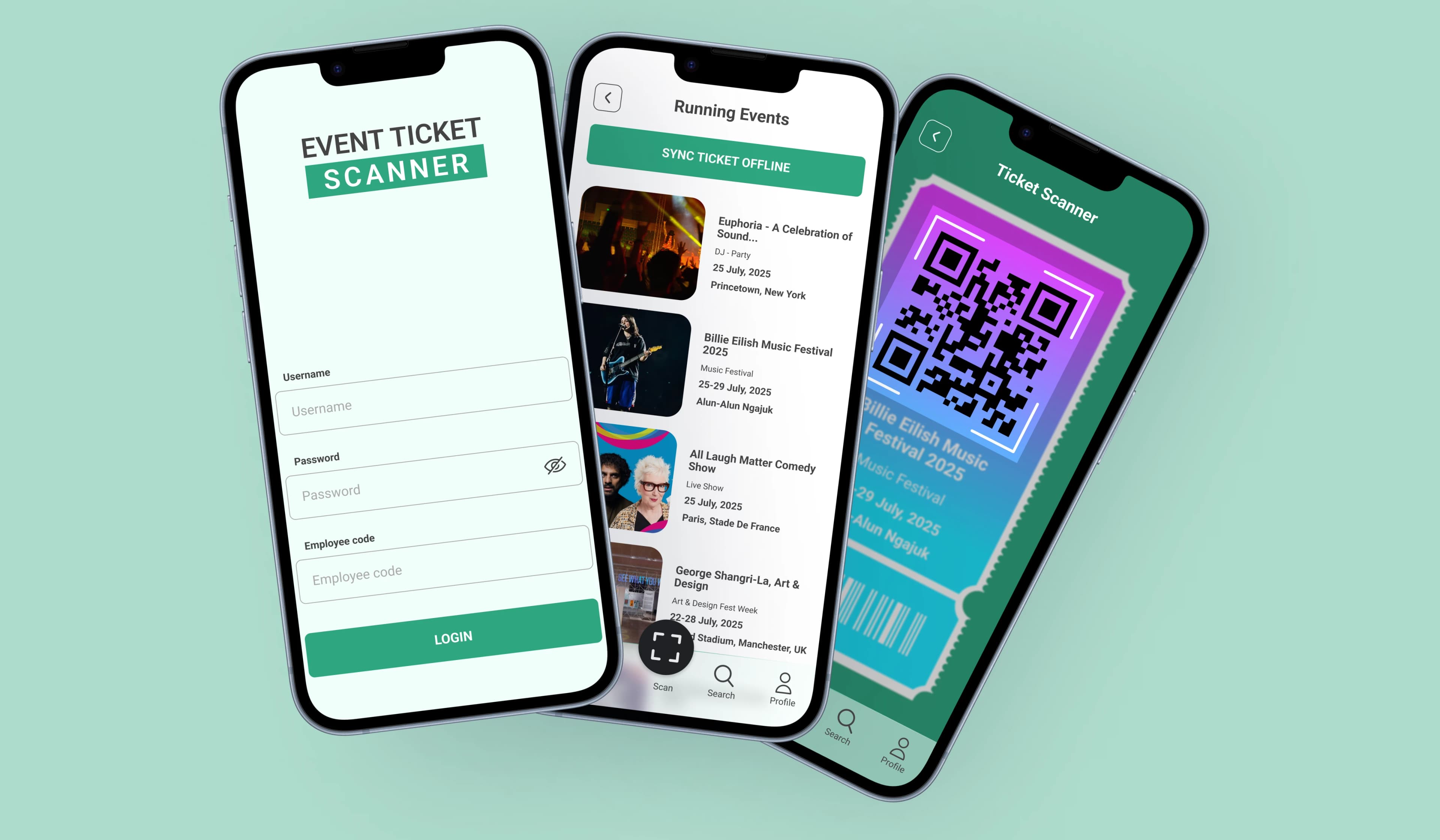
A fast, secure QR-code ticket scanning app for event organizers with real-time validation, duplicate prevention, and offline support.
Project Overview
Event Ticket Scanner is a fast, secure mobile app that enables event organizers to verify QR-code tickets with ease. Supporting both online and offline modes, it prevents duplicate entries, ensures real-time validation, and protects ticket data with end-to-end encryption. The app is scalable, user-friendly, and ideal for smooth, secure entry management at any event.
Technologies Used
Requirements
- Login & Authentication: Secure login via email/password login, Integration with social logins (Google, Facebook, Apple) and Add Two-factor authentication (2FA) for extra security.
- Core Features: Fast and accurate QR code scanning using the device camera, Support for both front and rear cameras and add ticket validation for security purposes.
- Duplicate Ticket Prevention: Instant alert if the same ticket is scanned twice.
- Online & Offline Access: Real-time ticket validation when online,Local storage-based validation in offline mode, with sync capability when the internet is restored.
- Push Notifications: Push notifications for staff about event updates and Alerts for abnormal scanning activities.
- 24/7 Support System: Integration with a customer support platform (e.g., live chat, ticketing system).
Solutions We Provided
- User Authentication: Firebase Authentication for Role-based access control (RBAC) with multi-factor authentication (MFA).
- QR Code Scanning: ML Kit & Vision API for Instantly scan tickets using the device's camera with high-speed recognition.
- Ticket Verification & Duplicate Prevention: Firebase Firestore for Check ticket authenticity in real-time using a secure validation process and Automatically block previously scanned or fraudulent tickets.
- Offline Mode: Store scanned ticket data locally and sync with the server when online.
- Secure Encryption: Implement AES-256 encryption for local storage and TLS for data transmission.
- Cloud Synchronization: Use Azure Functions and Firebase Sync for Sync data with the central server using Azure Cloud Services.
- Azure DevOps Deployment: Utilize Azure Pipelines for automated CI/CD, ensuring smooth deployment.
- Scalability & Performance: Optimized for low latency and high-speed processing, even in crowded event environments.
- Push Notifications: Use Firebase Cloud Messaging for give fraudulent alerts and updates of events.
Style Guide
From color palettes and typography to icons and micro-interactions, every design choice enhances usability, boosts engagement, and drives higher conversions in our e-commerce app.
Brand Colors
Fonts We Used
Inter
Aa Bb Cc Dd
1234567890
Explore More Our Work
Trusted By Global Clients



“Helomatrix didn't just build our product — they owned every challenge along the way. Proactive, responsive, and always solution-first. A team that truly shows up.”
Gaurika S
Founder & CEO @ Astrologically
🇮🇳India
“Helomatrix brought clarity to every stage of the project. Good management, consistent support, and a team that actually listened — that's what made this work.”
Kaushik Thakkar
Employee | Keytech
🇮🇳India
“The team delivered a polished and intuitive interface for MeatQ faster than expected. Their attention to design, branding, and usability helped turn our concept into a professional product ready to present with confidence.”

Ángel Escartín
Head of Research And Development @Humeco
🇪🇸Spain
GET IN TOUCH